


Content Menu
● Understanding the Core Components
● Connecting a Traditional Direct Laryngoscope
>> Step 1: Pre-Assembly Check and Preparation
>> Step 2: The Connection Process
>> Step 3: Verification of Secure Connection
● Connecting a Video Laryngoscope System
>> Step 2: The Physical and Electronic Connection
>> Step 3: Pre-Use Check and Configuration
● Troubleshooting Common Connection Issues
● Post-Use Disconnection and Handling
● Frequently Asked Questions (FAQ)
>> 1. What does it mean if my traditional laryngoscope blade doesn't "click" when I connect it?
>> 2. Can I use any brand of blade with any brand of handle?
>> 3. How often should I replace the batteries in a laryngoscope handle, even if it seems to work?
>> 4. Is it necessary to test the laryngoscope light before every single patient?
>> 5. What is the most important difference between connecting a direct vs. a video laryngoscope?
The laryngoscope is a quintessential tool for airway management, enabling visualization of the vocal cords for endotracheal intubation. Its seemingly simple operation belies the importance of a correct and secure setup. Knowing how to properly connect the various components of a laryngoscope—whether a traditional direct laryngoscope or a modern video laryngoscope—is a fundamental clinical skill. An improperly assembled laryngoscope can fail at a critical moment, leading to a dim or absent light, a dislodged blade during intubation, or a complete loss of visualization. This comprehensive guide provides step-by-step instructions for connecting and setting up different types of laryngoscope systems, ensuring device readiness, operator confidence, and, ultimately, patient safety.
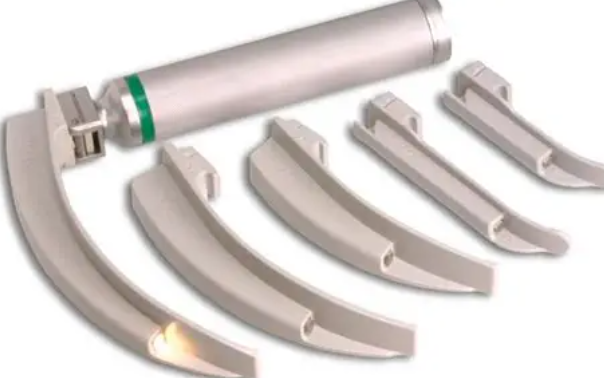
Before connecting anything, one must identify the parts. A basic direct laryngoscope consists of:
1. The Handle: The power source, containing batteries. It has a distal connector for the blade.
2. The Blade: The metal or plastic component that is inserted into the mouth. It has a light bulb or fiberoptic channel at its tip and a proximal hook or fitting that connects to the handle. Common types are Macintosh (curved) and Miller (straight).
3. The Light Source: In traditional scopes, this is a bulb within the blade. In fiberoptic models, light travels from the handle via a fiber bundle.
A video laryngoscope system adds:
4. The Video Blade: Contains a miniature camera and LED lights at the tip.
5. The Video Handle/Processor: Contains the electronics, battery, and often a screen.
6. The Display Monitor: A separate screen (sometimes integrated into the handle) that shows the camera's view.
This is the most common assembly process.
- Gather Components: Ensure you have a compatible handle and blade. A standard #3 or #4 laryngoscope handle fits most adult Macintosh and Miller blades.
- Inspect Components:
- Handle: Check for cracks or damage. Ensure the electrical contacts at the top are clean and free of corrosion. Perform a brief functional test by pressing the light switch (if present) – a faint glow from the contacts indicates battery power.
- Blade: Inspect for straightness, a secure bulb housing, and a clean, undamaged light bulb. Check the hook or connector for cracks or deformities.
- Ensure Fresh Batteries: The most common cause of laryngoscope failure is depleted batteries. Insert fresh batteries into the handle, observing correct polarity (+/-). For handles with a screw-top, ensure it is tightened securely.
1. Position the Blade: Hold the laryngoscope blade in your non-dominant hand with the hook/connector facing upward and the distal tip (the part that goes into the throat) pointing away from you.
2. Position the Handle: Hold the laryngoscope handle in your dominant hand, with the top (connector end) facing the blade's hook.
3. Engage the Hook: Insert the top of the handle into the slot on the blade's hook. The blade's connector should rest against the handle's electrical contact.
4. Secure the Blade: With a firm, smooth motion, push the blade upward until it clicks into place at a 90-degree angle (perpendicular) to the handle. You should hear and feel a distinct, secure click. This click is non-negotiable; it means the mechanical lock is engaged.
5. Functional Test: Before approaching the patient, test the light. Activate the switch (on handles with a switch) or simply ensure the light comes on when the blade is locked at 90 degrees (on direct-contact models). The light should be bright, white, and steady. A dim, yellow, or flickering light indicates weak batteries, a faulty bulb, or poor electrical contact.
Gently attempt to wiggle the blade. It should be rock-solid with no movement at the hinge. Visually confirm the blade is fully extended and locked perpendicular to the handle. This secure connection is vital to prevent the blade from folding accidentally during laryngoscopy, which would cause immediate loss of view and control.
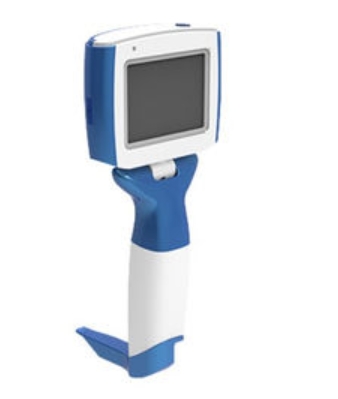
Video laryngoscope assembly is generally more straightforward but involves electronic components.
- Charge the Handle/Processor: Ensure the video laryngoscope handle is fully charged before the procedure.
- Inspect the Video Blade: Check the distal tip for a clean, unobstructed camera lens and LED lights. Look for any damage to the blade or its integrated cable.
- Power On: Turn on the video laryngoscope handle or main processor unit. Many devices perform a brief self-test.
1. Connect the Blade to the Handle: This is often a single, proprietary connector. Align the blade's cable connector with the port on the handle. It will typically have a keyed shape (so it only fits one way). Push it in firmly until it seats completely. You may hear a soft click. Never force the connection.
2. Automatic Activation: Upon secure connection, the system usually recognizes the blade automatically. The screen (on the handle or external monitor) will activate, and the LEDs on the blade tip will illuminate.
3. Monitor Connection (if separate): If using an external monitor, ensure it is connected to the handle/processor via the provided cable (HDMI, USB-C, etc.) and is powered on. Select the correct input source on the monitor.
1. Image Verification: Look at the screen. You should see a clear, well-lit image from the blade's camera. Point the blade at a text or patterned object to verify focus and clarity.
2. White Balance (if required): Some systems require a manual white balance. This involves pointing the blade at a white surface and pressing a button to calibrate colors. Consult the device-specific manual.
3. Adjust Settings: Configure screen brightness, video recording settings, or any other preferences according to your protocol before the procedure begins.
- No Light on Direct Laryngoscope:
1. Check Batteries: Replace with fresh batteries.
2. Check the Bulb: Ensure it is screwed in tightly and not burnt out. Replace if necessary.
3. Clean Contacts: Use a dry cloth or alcohol swab to clean the electrical contacts on the handle and blade hook. Corrosion is a common culprit.
4. Verify Connection: Ensure the blade is clicked fully into the locked position.
- Direct Laryngoscope: After use, unlock and remove the blade from the handle before cleaning. Immediately dispose of single-use blades in a sharps container. For reusable blades, begin the cleaning process separately from the handle. Always remove batteries from the handle if it will be stored for more than a short period.
- Video Laryngoscope: Gently disconnect the video blade from the handle. Begin cleaning the blade according to manufacturer instructions (often requires special care for the camera). Wipe down the handle with a disinfectant cloth, avoiding ports and connectors. Place the system on charge if required.
Connecting a laryngoscope correctly is a deceptively simple yet critical procedure that forms the bedrock of successful airway management. For the traditional direct laryngoscope, the emphasis is on a mechanical and electrical secure connection, verified by an audible click and a bright, steady light. For the video laryngoscope, it involves ensuring both a physical and electronic handshake between components, resulting in a clear, reliable image on the screen.
Mastering this skill requires an understanding of the components, a methodical approach to assembly, and a rigorous pre-use checklist. It also demands diligent maintenance of batteries, bulbs, and contacts. Time spent ensuring a proper laryngoscope connection is never wasted; it is an investment in preventing equipment failure at the most crucial moment. Whether using a decades-old Macintosh blade or the latest digital system, the principle remains: a correctly connected laryngoscope is a safe, effective, and trustworthy extension of the clinician's skill, illuminating the path to a secure airway.

If you do not hear or feel a definitive click when attaching the blade to the handle, the connection is not secure. Do not use it. This likely indicates a worn or damaged locking mechanism on either the blade hook or the handle. A blade that is not locked can fold closed during an intubation attempt, which is dangerous. Remove the blade, inspect both components for damage, and use a different laryngoscope set.
No, not universally. While there is some standardization (e.g., a #3 handle typically fits standard Macintosh/Miller blades), compatibility is not guaranteed across all manufacturers. Connector designs, hook shapes, and electrical contact placements can vary slightly. Using an incompatible blade may result in a poor fit, a weak or non-existent light, or a failure to lock. It is safest to use blades and handles from the same manufacturer or confirmed compatible sets.
Best practice is to replace batteries at the start of every clinical shift or before every intubation in a high-stakes environment (like the OR or ICU). Do not wait for the light to dim. Weak batteries provide suboptimal illumination, compromising your view. For handles in crash carts or code bags, implement a strict schedule (e.g., monthly) to check and replace batteries, as they can degrade over time even without use.
Yes, absolutely. This is a mandatory step in the pre-procedure checklist. Testing the laryngoscope light confirms: 1) electrical continuity, 2) sufficient battery power, and 3) a functioning bulb or LED. Discovering a failed light only after you have positioned it in the patient's mouth is a preventable error that delays securing the airway and compromises patient safety.
The key difference is the nature of the connection verification. For a direct laryngoscope, you rely on physical and sensory feedback (the click, the solid lock, visually checking the bright light). For a video laryngoscope, you rely on electronic and visual feedback (a secure connector click, system power-on indicators, and most importantly, the appearance of a clear, well-lit image on the digital screen). Both require a secure physical connection, but the video system provides an additional, explicit visual confirmation of functionality before the blade enters the patient's airway.
[1] https://www.ncbi.nlm.nih.gov/books/NBK493224/
[2] https://www.thoracic.org/professionals/clinical-resources/critical-care/clinical-education/airway/managing-the-airway.php
[3] https://www.laryngoscope.com/
[4] https://www.apsf.org/article/pre-use-check-of-laryngoscopes/
[5] https://anaesthetists.org/Home/Resources-publications/Guidelines/Checking-anaesthetic-equipment
[6] https://www.fda.gov/medical-devices/general-hospital-devices-and-supplies/laryngoscopes
[7] https://emcrit.org/ibcc/airway-equipment/
[8] https://www.rcoa.ac.uk/safety-standards-quality/guidance-resources/safety-alerts/equipment-checking-laryngoscopes
[9] https://www.cambridge.org/core/journals/anaesthesia/article/guide-to-laryngoscope-handle-and-blade-compatibility/ABC1234567890


